A personal account number
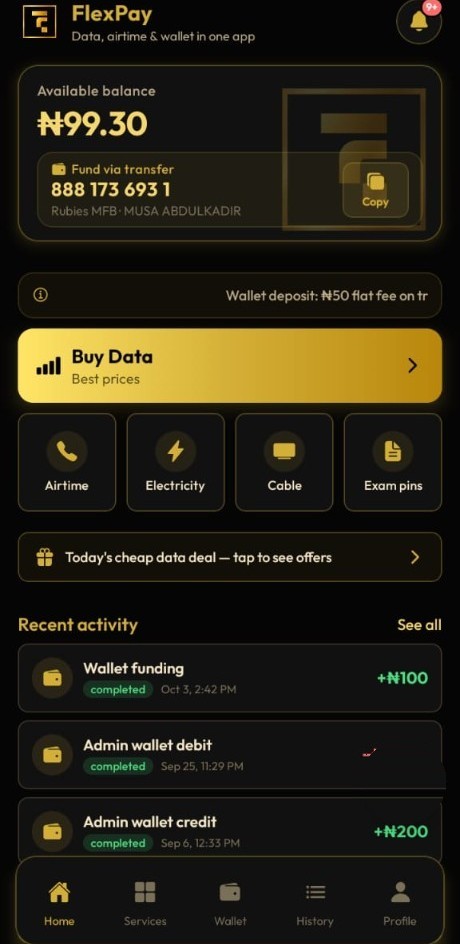
Shown on the home screen after you verify with NIN or BVN. Copy it, transfer from the bank you already use, and watch the credit appear in history.
Transfer money to a personal account number. Spend it on data, airtime, cable TV, electricity, exam pins and bulk SMS. Each purchase asks for your 4-digit PIN.

WALLET
YOUR WALLET
MEMBER
YOUR NAME
FUNDING
BANK TRANSFER
Inside FlexPay
FlexPay is the wallet you fund, and the place you spend it. Balance, catalog, receipt and profile sit in one app, so a data plan, a light token and the proof of payment never need a second login.
The wallet
FlexPay is a wallet, funded by bank transfer. After a one-time NIN or BVN check you get a personal account number. Money you send there becomes the balance that pays for data, airtime, cable, electricity, exam pins and bulk SMS.
Personal account
NIN or BVN once. FlexPay issues the account number and shows it on your home screen, with a copy button.
Any Nigerian bank
Transfer from the bank app you already use. The wallet updates when the payment settles.
Spend with a PIN
Pick the service, check the number or meter, then confirm with the 4-digit PIN you created.
WALLET
YOUR WALLET
MEMBER
YOUR NAME
FUNDING
BANK TRANSFER
Your name on the wallet. Money in by bank transfer. Spend it with your PIN.
What you can do
FlexPay is built for the payments Nigerians already make every week. You fund once, then stay inside the wallet until the receipt is saved.
Shown on the home screen after you verify with NIN or BVN. Copy it, transfer from the bank you already use, and watch the credit appear in history.
MTN, Airtel, Glo and 9mobile. Pick SME, Corporate Gifting or Direct Gifting, then the plan, then the number that should receive it.
Same four networks. Type the number, enter the amount, confirm the PIN. No separate airtime app.
Prepaid and postpaid meters. DStv, GOtv and StarTimes. WAEC, NECO and NABTEB checkers, delivered into the order.
One message, many numbers, paid the way every other purchase is paid. Open the receipt if you need to check it later.
Credits, debits and reversals, with status and a reference. Search when a payment needs to be found again.
Services
Each one is bought from your balance and confirmed with your PIN. The price is on the plan you pick after you sign in.
MTN, Airtel, Glo and 9mobile. Choose the number, then the type of plan: SME, Corporate Gifting or Direct Gifting. The plan list is the one the Android app uses.
Any amount, on the same four networks. You type the number and confirm with your PIN.
Prepaid tokens and postpaid meters. The meter number is what you enter before you pay.
DStv, GOtv and StarTimes. Renew the smartcard or IUC that is already on the decoder.
WAEC, NECO and NABTEB result checkers. The pin is delivered into your order.
One message to many numbers, sent from the wallet like any other purchase.
Expanding soon
These three are next on FlexPay. They will be bought from the same wallet, with the same PIN, once they open. They are not available yet.
Who it’s for
You already know the network and the number. FlexPay is the shorter path: fund the wallet, open Data, choose SME, Corporate Gifting or Direct Gifting, and confirm. The plan list is the same one the Android app uses.
Light and cable do not need a different balance. Enter the meter, or the DStv, GOtv or StarTimes number, and pay from the money already in the wallet. The receipt stays in history with the rest.
Exam pins for WAEC, NECO and NABTEB come back on the order. Bulk SMS goes out to many numbers from the same wallet. Both are purchases, both ask for the PIN, both can be opened again later.
How it works
Email, phone number and a password. Add a friend’s referral code if you have one.
Submit NIN or BVN once. The personal account appears on the home screen.
Pay that account from your bank. The credit shows in your transaction history.
Choose the service, confirm the PIN, and reopen the order whenever you need it.
4-digit transaction PIN
You set it yourself. It is asked on every purchase, separate from the password you use to sign in. Biometric unlock can open the app on your phone. It does not replace the PIN when money moves.
Get FlexPay
Install FlexPay from Google Play if you are on Android. On iPhone, or on a computer, open the web app and sign in with the same email. Your balance, account number and history follow the account, not the device.
Create an account, get a personal account number, and buy from the same catalog as the Android app.
Try the web